
Setup Guide
Empowering Your Journey Towards Seamless TV Enjoyment.
NOTE: If You are New user Then Contact Us on Live Chat for GBTV username and Password

Amazon Firestick Installation
We have 2 Application Right Now GBTV 2.0 and OTT Pro both are Our Apps but Different interface .
- Installation Steps
Go to left side of the Firestick Home screen and there will be Find or search button Click on that
and go to Search and type Downloader
and Download the Downloader ( with D icon with Down Arrow ) Orange Colour
Open Downloader
For GBTV 2.0 Enter the Code 8063449 / ( 287731 for OTT Pro App )
and press on GO
it will redirect and will start downloading
Click install
when App installed Click Open - Login Steps
In First line where is Any Name ( Put GBTV )
in username putt Your Username
in password Putt Your password
Click on Add UserMost IMPORTANT:
-
You may be prompted ( For Your Security Your Tv is Not Allowed to install unknown Apps )
if So then
Click on Settings
Go to About
And click on My Firetv 7 times continuously very Fast
and it should Say No Need You are already a Developer
and then click on Back Button on Your remote and there will Be Developer Option
Click on Developer Option and Scroll Down Go to install unknown Apps
Go to Downloader and Turn it ON
And then click on Back button on Your remote click it until it will ask you to install Option
just Hit the install

Android Devices (Android Mobile, Chromecast, Android Boxes
You need to Download a Downloader From Google Play Store as in image Below
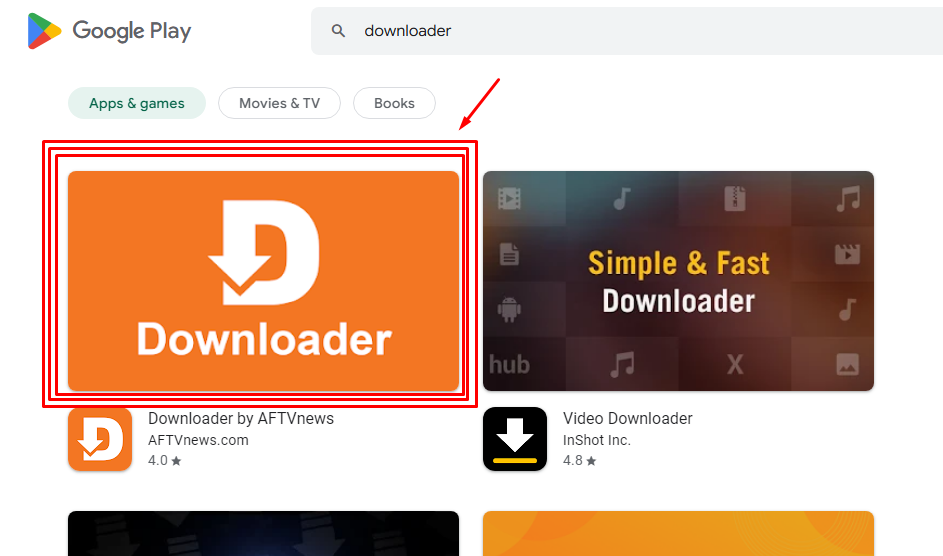
- Device Steps
Open Downloader - For GBTV 2.0 Enter the Code 8063449 / ( 287731 for OTT Pro App )
- and press on GO it will redirect when its asked click Download anyway Click install when App installed Click Open
In First line where is Any Name ( Put GBTV )
in username putt Your Username
in password Putt Your password
Click on Add User - Please Note
We can not offer phone assistance for installing the app, best and easiest Way Go to Live Chat and we will Guide You